
GMC Acadia Tire Pressure & TPMS
Use the door label for cold pressure. Choose your model year to find the correct tire sensor procedure.
Tire Pressure & TPMS by model year
2027 GMC Acadia

- Front and rear cold pressure
- Read the driver-door placard
- Compact spare, if equipped
- 60 psi cold
Where the pressure is printed
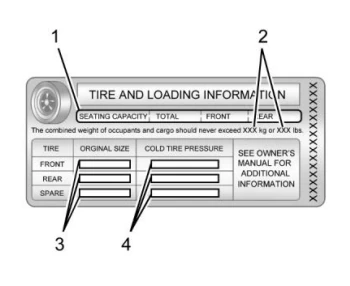
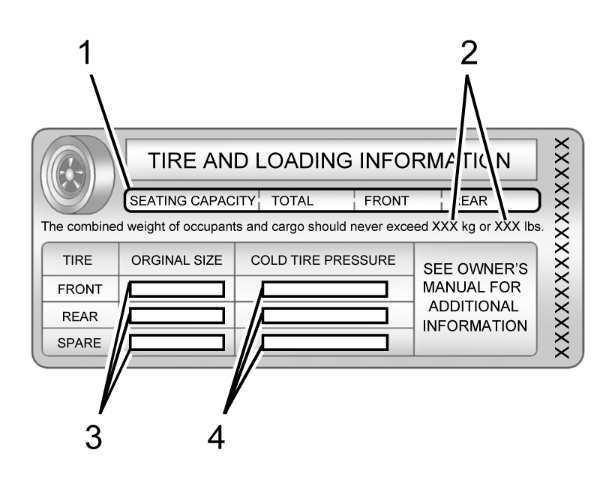
Open the driver door and find the Tire and Loading Information sticker on the center pillar. Match the original tire size and read its front and rear cold pressures. If equipped, the compact spare uses 60 psi (420 kPa) cold.
TPMS reset and sensor relearn
If equipped with Auto Learn, park for about 20 minutes. Then drive at 12 mph or faster for up to 10 minutes.
Matching with a TPMS tool
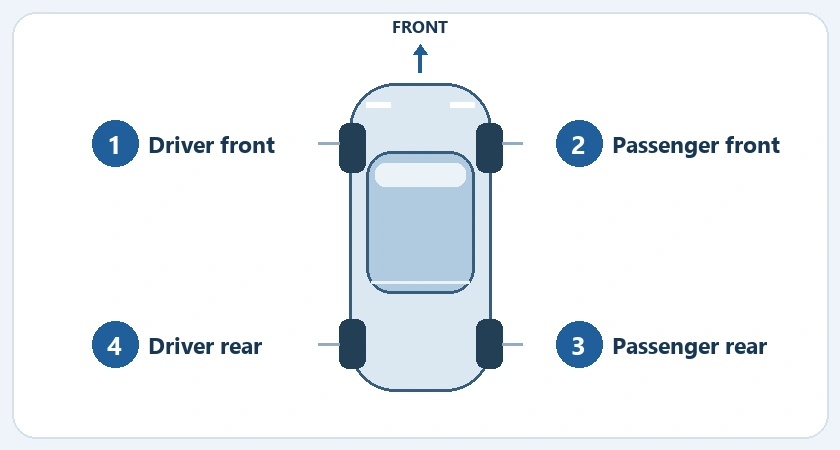
Put the vehicle in Park, set the parking brake and enter Service Mode. Open Vehicle Status → Tire Pressure or Tires → Relearn Sensors. After the horn sounds twice, trigger each sensor at the valve stem in this order: driver front, passenger front, passenger rear, driver rear. You have two minutes for the first tire and five minutes total.
Door label · Tire inflation · Factory matching procedure · Procedure continued
2026 GMC Acadia
- Front and rear cold pressure
- Read the driver-door placard
- Compact spare, if equipped
- 60 psi cold
Where the pressure is printed
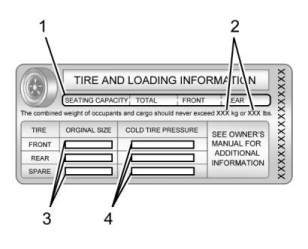
Open the driver door and find the Tire and Loading Information sticker on the center pillar. Match the original tire size and read its front and rear cold pressures. If equipped, the compact spare uses 60 psi (420 kPa) cold.
TPMS reset and sensor relearn
Check at least monthly with a gauge. Check after the vehicle has rested at least three hours or has driven no more than 1 mi (1.6 km). The light flashing for about one minute then staying on indicates a TPMS malfunction. A warning also appears in the Driver Information Center.
If equipped with Auto Learn, park for about 20 minutes. Then drive at 12 mph or faster for up to 10 minutes.
2025 GMC Acadia
- Michelin fitment reference
- 35 psi front / 35 psi rear
- Compact spare, if equipped
- 60 psi cold
| Tire size | Trim or option | Front | Rear |
|---|---|---|---|
| P255/65R18 109S | Elevation | 35 psi | 35 psi |
| 265/65R18 114T | AT4 | 35 psi | 35 psi |
| 255/55R20 107H | Elevation or Denali | 35 psi | 35 psi |
| 275/45R22 108V | Elevation option or Denali option | 35 psi | 35 psi |
These are Michelin’s listed values for the exact tire sizes and ratings shown. Match your size and read the front and rear values on the driver-door placard. If the placard differs, follow it. Michelin pressure data · Goodyear trim and size lookup
Where the pressure is printed
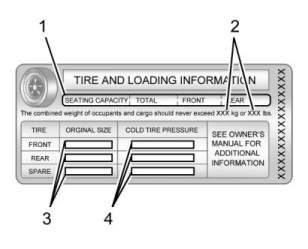
Open the driver door and find the Tire and Loading Information sticker on the center pillar. Match the original tire size and read its front and rear cold pressures. If equipped, the compact spare uses 60 psi (420 kPa) cold.
TPMS reset and sensor relearn
Check at least monthly with a gauge. Check after the vehicle has rested at least three hours or has driven no more than 1 mi (1.6 km). The light flashing for about one minute then staying on indicates a TPMS malfunction. A warning also appears in the Driver Information Center.
If equipped with Auto Learn, park for about 20 minutes. Then drive at 12 mph or faster for up to 10 minutes.
2024 GMC Acadia
- Front and rear cold pressure
- Read the driver-door placard
- Compact spare, if equipped
- 60 psi cold
Where the pressure is printed
Open the driver door and find the Tire and Loading Information sticker on the center pillar. Match the original tire size and read its front and rear cold pressures. If equipped, the compact spare uses 60 psi (420 kPa) cold.
TPMS reset and sensor relearn
If equipped with Auto Learn, park for about 20 minutes. Then drive at 12 mph or faster for up to 10 minutes.
If a shop sees codes C1171–C1174 after a failed relearn, GM lists a separate service procedure for some 2024 Acadias. Ask the technician to verify vehicle applicability and stored codes. GM service bulletin.
2023 GMC Acadia
- Front and rear cold pressure
- Read the driver-door placard
- Compact spare, if equipped
- 60 psi cold
Where the pressure is printed
Open the driver door and find the Tire and Loading Information sticker on the center pillar. Match the original tire size and read its front and rear cold pressures. If equipped, the compact spare uses 60 psi (420 kPa) cold.
TPMS reset and sensor relearn
Check at least monthly with a gauge. Check after the vehicle has rested at least three hours or has driven no more than 1 mi (1.6 km). The light flashing for about one minute then staying on indicates a TPMS malfunction. A warning also appears in the Driver Information Center.
Set the parking brake, enter Service Mode and hold the center select button on the Tire Pressure display. Two horn sounds confirm relearn mode. Use the relearn tool in this order: Driver front → Passenger front → Passenger rear → Driver rear. Allow up to 2 minutes for the first wheel and 5 minutes total.
Door label · Tire inflation · Factory matching procedure · Procedure continued
Tire pressure light stays on or flashes
| What you see | What to do |
|---|---|
| Light is steady | Check each road tire with a gauge. Set the cold pressure to the door placard. Recheck a tire that loses air again. |
| Light comes on cold, then goes out | Check the tires before the next drive. A tire can be near the warning threshold cold and rise above it as it warms. |
| Light flashes for about one minute, then stays on | Confirm pressure with a gauge first. A missing, incompatible or unlearned sensor can trigger this pattern. Follow the relearn for your model year. |
| A reading is missing or follows the wrong corner after rotation | Use the year-specific matching procedure. If one reading remains missing after a completed relearn, ask a tire shop to test that sensor and verify compatibility. |
Check cold pressure at least monthly, including the spare where fitted. NHTSA tire pressure guidance.
How to check and adjust cold tire pressure
- Use the door-label values with a gauge before driving, after at least three hours parked or a trip of no more than 1 mi.
- Set the front and rear tires to their listed values. Refit the valve caps and check the spare if fitted.
- If a tire loses pressure repeatedly, check for a leak or damage before relying on the TPMS display.
On vehicles with Tire Fill Alert, watch for the turn signal while filling. A single horn chirp signals the target pressure. Use a gauge if the turn signal does not respond. GMC Tire Fill Alert instructions.
Compare your gauge with the door label
Enter the cold pressure from the driver-door label and your gauge reading. Choose the units printed on each. Use the front or rear target for the tire you are measuring.
240 kPa is approximately 34.8 psi or 2.40 bar. NHTSA cold-pressure guidance.


