
GMC Sierra 1500 Tire Pressure & TPMS
Read the cold front and rear pressures from your driver-door label. If the warning flashes before staying on, use the sensor troubleshooting steps below.
Where to find front and rear PSI
Check pressures before driving, while the tires are cold. The vehicle label gives pressure by axle for the truck’s original setup. The sidewall lists a tire limit. If your setup has changed, confirm the correct load and pressure with a qualified tire professional.
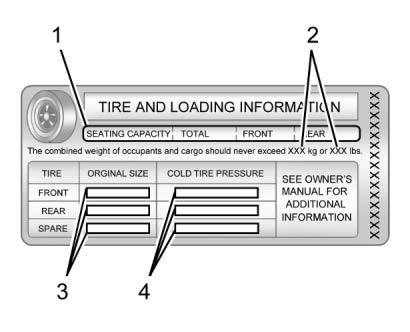
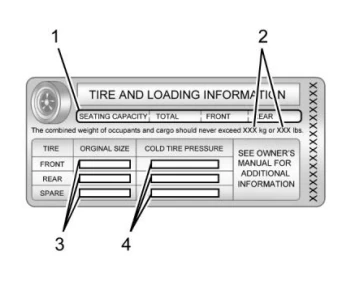
Open the driver door and look around the latch-side door opening for these two labels.
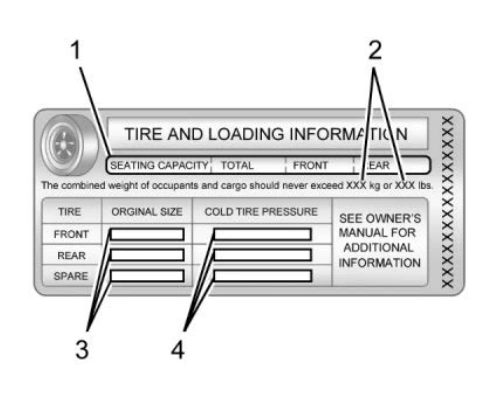
Read the front and rear COLD TIRE PRESSURE rows. The label also gives the original tire size and the combined occupant and cargo limit.
Factory illustration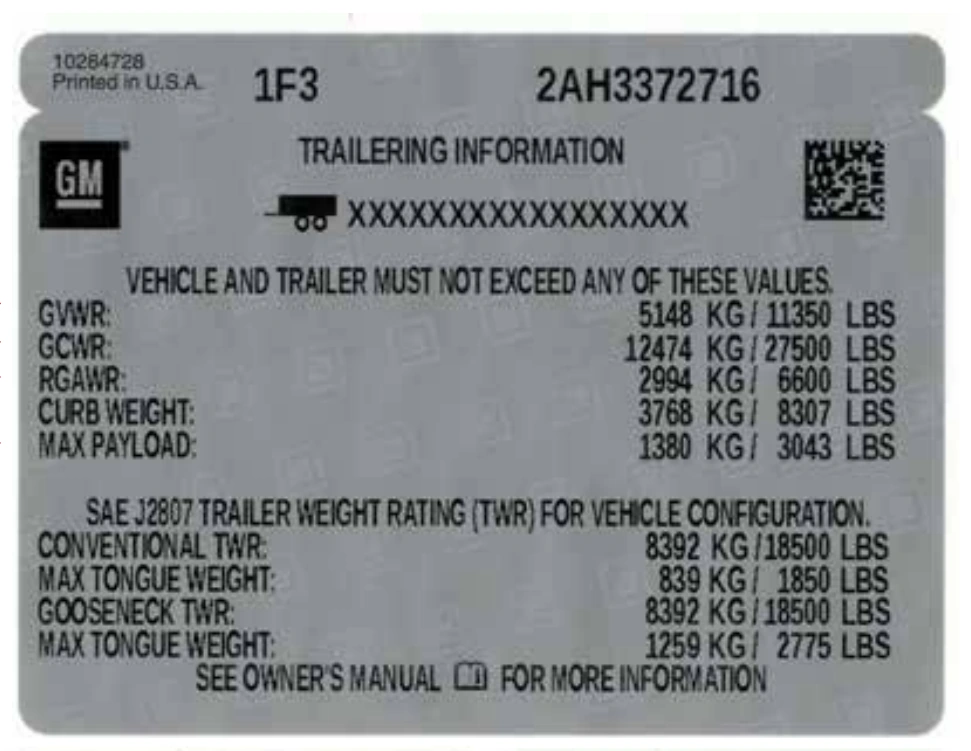
Read the trailer rating, maximum tongue weight and axle limits on your truck’s label. GMC uses a Sierra Heavy Duty example in this illustration.
Factory illustrationClear a pressure warning or diagnose a sensor
2023 Sierra 1500
| What you see | What to do | GM source |
|---|---|---|
| Find cold pressure | Read the front and rear numbers on the Tire and Loading Information label inside the driver-door opening. | PDF leaf 214 |
| Light stays on | Check each tire cold, set each axle to the label value, and check for continued loss. | PDF leaf 391 |
| Flashes for about a minute, then stays on | Treat it as a TPMS system problem. Check sensor fitment and use the matching procedure in the manual. | PDF leaf 392 |
| After tire or sensor work | Follow the truck’s automatic matching instructions. Leave it stationary for about 20 minutes before recalculation, then drive for up to 10 minutes at 12 mph or more. | PDF leaf 393 |
| Tire Fill Alert, when equipped | With the vehicle parked, follow the manual’s turn-signal and horn feedback while filling. Confirm the final cold pressure with a gauge. | PDF leaf 392 |
2024 Sierra 1500
| What you see | What to do | GM source |
|---|---|---|
| Find cold pressure | Read the front and rear numbers on the Tire and Loading Information label inside the driver-door opening. | PDF leaf 215 |
| Light stays on | Check each tire cold, set each axle to the label value, and check for continued loss. | PDF leaf 395 |
| Flashes for about a minute, then stays on | Treat it as a TPMS system problem. Check sensor fitment and use the matching procedure in the manual. | PDF leaf 396 |
| After tire or sensor work | Follow the truck’s automatic matching instructions. Leave it stationary for about 20 minutes before recalculation, then drive for up to 10 minutes at 12 mph or more. | PDF leaf 397 |
| Tire Fill Alert, when equipped | With the vehicle parked, follow the manual’s turn-signal and horn feedback while filling. Confirm the final cold pressure with a gauge. | PDF leaf 396 |
2025 Sierra 1500
| What you see | What to do | GM source |
|---|---|---|
| Find cold pressure | Read the front and rear numbers on the Tire and Loading Information label inside the driver-door opening. | PDF leaf 211 |
| Light stays on | Check each tire cold, set each axle to the label value, and check for continued loss. | PDF leaf 388 |
| Flashes for about a minute, then stays on | Treat it as a TPMS system problem. Check sensor fitment and use the matching procedure in the manual. | PDF leaf 389 |
| After tire or sensor work | Follow the truck’s automatic matching instructions. Leave it stationary for about 20 minutes before recalculation, then drive for up to 10 minutes at 12 mph or more. | PDF leaf 390 |
| Tire Fill Alert, when equipped | With the vehicle parked, follow the manual’s turn-signal and horn feedback while filling. Confirm the final cold pressure with a gauge. | PDF leaf 389 |
2026 Sierra 1500
| What you see | What to do | GM source |
|---|---|---|
| Find cold pressure | Read the front and rear numbers on the Tire and Loading Information label inside the driver-door opening. | PDF leaf 212 |
| Light stays on | Check each tire cold, set each axle to the label value, and check for continued loss. | PDF leaf 359 |
| Flashes for about a minute, then stays on | Treat it as a TPMS system problem. Check sensor fitment and use the matching procedure in the manual. | PDF leaf 360 |
| After tire or sensor work | Follow the truck’s automatic matching instructions. Leave it stationary for about 20 minutes before recalculation, then drive for up to 10 minutes at 12 mph or more. | PDF leaf 361 |
| Tire Fill Alert, when equipped | With the vehicle parked, follow the manual’s turn-signal and horn feedback while filling. Confirm the final cold pressure with a gauge. | PDF leaf 360 |
Tire pressure light stays on or flashes
| What you see | What to do |
|---|---|
| Light is steady | Check each road tire with a gauge. Set the cold pressure to the door placard. Recheck a tire that loses air again. |
| Light comes on cold, then goes out | Check the tires before the next drive. A tire can be near the warning threshold cold and rise above it as it warms. |
| Light flashes for about one minute, then stays on | Confirm pressure with a gauge first. A missing, incompatible or unlearned sensor can trigger this pattern. Follow the relearn for your model year. |
| A reading is missing or follows the wrong corner after rotation | Use the year-specific matching procedure. If one reading remains missing after a completed relearn, ask a tire shop to test that sensor and verify compatibility. |
Check cold pressure at least monthly, including the spare where fitted. NHTSA tire pressure guidance.
Compare your gauge with the door label
Enter the cold pressure from the driver-door label and your gauge reading. Choose the units printed on each. Use the front or rear target for the tire you are measuring.
240 kPa is approximately 34.8 psi or 2.40 bar. NHTSA cold-pressure guidance.


